
ASCENDING Home
Jarvis AI
Cloud Services
Talent Solutions
Public Sector
About
Contact Us

ChatGPT Desktop and Codex on Amazon Bedrock: Managed Setup and Governance

ChatGPT and Codex 3P route inference through Amazon Bedrock Runtime in your AWS account, with AWS credentials supplied through IAM Identity Center. Managed configuration pins the provider; IAM or an SCP decides which models are allowed. AWS inference charges are separate from implementation and any first-party OpenAI subscription.

Deployment Options

First-Party OpenAI or Bedrock Inference?

ChatGPT and Codex 3P is a distinct deployment mode, not a Bedrock add-on to an OpenAI subscription. Choose it when your organization requires AWS-governed inference; first-party OpenAI plans may be simpler when those requirements do not apply.

First-party plans

ChatGPT / Codex with an OpenAI account

With ChatGPT sign-in, requests go to OpenAI-hosted services. Pricing and included usage follow your ChatGPT plan or agreement, separate from a third-party (3P) deployment on Amazon Bedrock.

ChatGPT / Codex with an OpenAI account feature availability
FeatureAvailability
ChatGPT desktop app Supported
Codex in desktop app / CLI / IDE Supported
ChatGPT Work on web / Codex cloud Supported
Local review, sandboxing, worktrees Supported

Keep a first-party plan where hosted ChatGPT, Codex cloud, cloud agents or the cloud plugin store are required. 3P is not an automatic migration of an existing subscription.
Third-party deployment

ChatGPT Desktop and Codex on Bedrock

The ChatGPT desktop app, Codex CLI and IDE extension route inference to Amazon Bedrock. Model requests use AWS-native credentials, and AWS bills inference usage separately from implementation or a first-party subscription.

ChatGPT Desktop and Codex on Bedrock feature availability
FeatureAvailability
ChatGPT desktop app Supported
Codex in desktop app / CLI / IDE Supported
ChatGPT Work on web / Codex cloud Not available
Local review, sandboxing, worktrees Supported

Local workflows, with a different feature set from first-party plans. Cloud configuration and policies, cloud agents and the cloud plugin store are not available through this Bedrock path.

See OpenAI’s Amazon Bedrock feature availability for current support. Confirm supported workflows for each managed rollout.

Managed Rollout

Roll out ChatGPT and Codex with managed configuration

Admins set defaults and requirements centrally, deliver them to devices through MDM or bootstrap delivery, and configure AWS IAM Identity Center credentials for Bedrock requests.

01 — Defaults

New-thread model settings

The [models.new_thread] section in requirements.toml sets the starting model and reasoning effort. People can change these defaults within their AWS permissions.

02 — Requirements

requirements.toml

Pins amazon-bedrock-runtime, the AWS profile and Region, and disables Runtime web search. IAM or an SCP enforces model permissions.

03 — Sign-in

AWS IAM Identity Center

auth_refresh re-runs aws sso login --profile CCWB when credentials expire. The AWS CLI must be available to the app so browser sign-in can complete.

The current generator uses requirements.toml for both requirements and defaults; it no longer writes the older managed_config.toml file.

Access Boundaries

What client settings can and cannot enforce

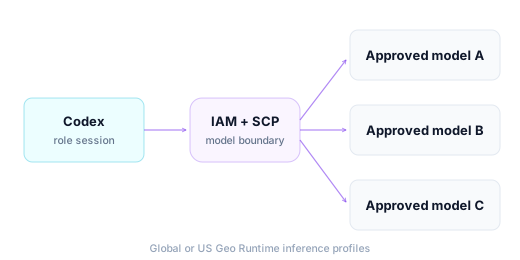
requirements.toml pins the provider and its AWS configuration, but it has no supported model allowlist. Client settings do not replace AWS authorization. Use IAM permissions or a service control policy (SCP) to decide which Bedrock models the principal can invoke.

Capabilities

Govern ChatGPT and Codex with the Controls

Client files set the route. AWS IAM, applicable SCPs and configured CloudTrail logging govern requests that reach Bedrock.

Provider Pinned

requirements.toml pins amazon-bedrock-runtime, the AWS profile and Region for managed clients.

Approved Defaults

requirements.toml sets new-thread defaults for model and reasoning effort, and enforces disabled Runtime web search.

AWS SSO Sign-In

People sign in through IAM Identity Center; auth_refresh renews credentials when they expire.

Model Boundary in AWS

IAM permission sets and SCPs decide which Bedrock models a person can call.

Audit by Role Session

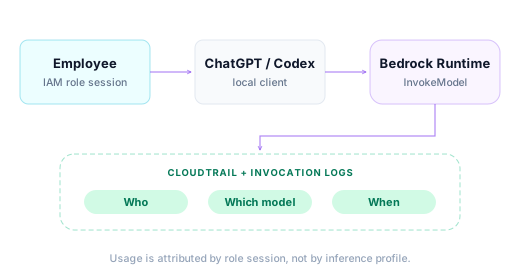
Configured CloudTrail and Bedrock invocation logs associate requests with the employee’s role session.

Clean Removal

Removing the managed profile leaves the user’s own Codex settings in place.

01 — Deploy

Ship the Same Policy to Every Mac and PC

One config.json generates the managed requirements, a macOS .mobileconfig and an AWS CLI profile. On Windows, deploy the generated requirements.toml to the protected machine-wide Codex directory.

Use device management or bootstrap delivery for the policy; people authorize Bedrock requests through AWS IAM Identity Center.

macOS .mobileconfigWindows requirements.toml
One sourceconfig.jsonProvider · model · Region · AWS profile
requirements.tomlEnforced provider and new-thread defaults
macOSManaged profile.mobileconfig
WindowsProtected machine filerequirements.toml

AWS IAM Identity Center provides credentials for Bedrock requests.

02 — Models

Approved Defaults, Enforced in AWS

Use approved Global or US Geo Runtime inference profile IDs, and confirm availability for the target model and AWS Region. Codex uses Runtime profile IDs rather than application inference profiles. Client settings supply defaults; IAM permissions or an SCP decide which models the principal can call.

Approved Defaults, Enforced in AWS
03 — Audit

See Who Used Which Model

Configured CloudTrail and Bedrock invocation logs record requests with the employee’s role session. Claude-style application inference profile cost allocation does not apply to Codex, so use role-session records for usage attribution and correlate them with billing data where needed.

CloudTrailInvocation logs
See Who Used Which Model
04 — Cost Attribution

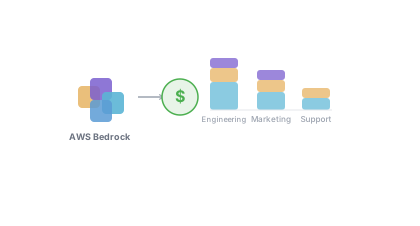
Know Which Teams Are Driving Your AI Bill

On Bedrock, requests carry the employee’s AWS role session. Combine this usage record with team mappings and model pricing to build department, project or application reporting, instead of treating the role-session log as a bill by itself.

Department-level reportingProject-level breakdownFinance-ready exports
Know Which Teams Are Driving Your AI Bill
05 — Spending Monitoring

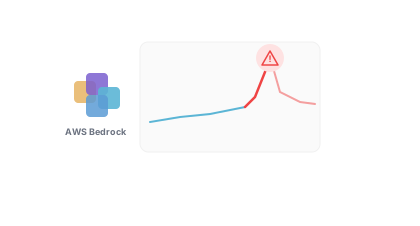
Catch Budget Overruns Before They Happen

AI usage can spike fast. ASCENDING can deploy a spending monitoring agent in your environment to track usage, flag anomalies, alert your team as budgets approach thresholds and answer plain-English questions about spend. Cost reporting and alerts depend on the telemetry configured for your deployment.

Budget alertsAnomaly detectionNatural language queriesIncluded with agreed deployment
Catch Budget Overruns Before They Happen
06 — Governance Foundation

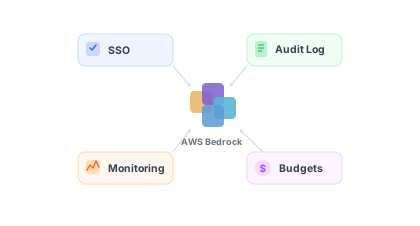
One Set of Rules for Every AI User in Your Organization

A Bedrock governance foundation gives every ChatGPT and Codex user the same policy framework: who can access AI, which models they can call, and what it costs, managed by IT and operations without touching individual accounts.

Centralized access policiesTeam budgetsConfigured audit trailSSO integration
One Set of Rules for Every AI User in Your Organization
07 — Data Security & Privacy

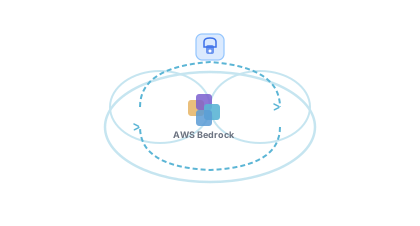
Your Business Data Stays in Your Business

Route inference through your AWS account with IAM permissions, configured audit and the applicable Bedrock data protections. Choose the Region and inference profile deliberately: cross-Region profiles can process requests across their supported Regions, and local client files or external tools have their own data paths.

AWS-governed inferenceModel data protectionsExplicit routing scopeConfigured encryption
Your Business Data Stays in Your Business
08 — Best Practices

Start Governed. Scale With Confidence.

ASCENDING establishes the right foundation from day one: secure architecture patterns, internal data connectivity, Infrastructure as Code, and operational enablement for your teams.

Proven architecture patternsInternal data connectivityOps team enablementInfrastructure as Code
Start Governed. Scale With Confidence.

Ready to Run ChatGPT and Codex on Your Bedrock Account?

ASCENDING configures the managed files, AWS sign-in and account guardrails with your team.

View on GitHub
At a glance

What is and is not enforced

Where each ChatGPT and Codex governance question is answered.

Governance controls for ChatGPT and Codex on Bedrock
Governance questionWhere it is answered
Which provider does Codex use?Pinned to amazon-bedrock-runtime by requirements.toml.
Which model is the default?An approved Runtime inference profile ID, set under [models.new_thread] in requirements.toml.
Which models are allowed?Decided by IAM or an SCP. Codex has no supported model allowlist.
How do people sign in?AWS IAM Identity Center, renewed by auth_refresh.
Who used what?The employee’s role session in CloudTrail or Bedrock invocation logs.
How is cost attributed?Correlate role-session usage with model pricing. Claude-style application-profile cost allocation does not apply to Codex.
Specifications

ChatGPT and Codex on Bedrock technical specifications

Configuration and runtime facts from the coding-agent-3p repository.

Managed configuration and runtime specifications
SpecificationValue
Provideramazon-bedrock-runtime (built into Codex)
GatewayNone; the client calls Bedrock Runtime directly
Model IDsGlobal or US Geo Runtime inference profile IDs
Approved defaultsApproved Global or US Geo Runtime inference profile IDs; confirm model and Region availability
Sign-inAWS IAM Identity Center, profile CCWB
Credential refreshauth_refresh re-runs aws sso login, up to five minutes for browser sign-in
macOS delivery.mobileconfig through MDM or bootstrap delivery
Windows delivery%ProgramData%\OpenAI\Codex\requirements.toml, writable only by administrators
Model boundaryIAM permission set or SCP
Sourcecoding-agent-3p, open source
Rollout

How to roll out ChatGPT and Codex on Bedrock

The sequence assumes IAM Identity Center is in place. Each step can be verified before the next.

  1. Prepare AWS access. Create a Bedrock permission set in IAM Identity Center and scope it to the approved Runtime inference profiles.

  2. Deploy account guardrails. Apply bedrock-governance so the SCP and CloudTrail cover Codex alongside other Bedrock workloads.

  3. Generate the files. Fill in config.json and render requirements.toml, the macOS managed profile and the AWS CLI profile.

  4. Distribute. Deploy the macOS .mobileconfig or Windows requirements.toml through device management or bootstrap delivery.

  5. Verify. Run the test plan: sign-in, a model call, a local tool call and the CloudTrail record.

In practice

Validation status

Reported in the coding-agent-3p repository test plan as of November 2, 2026. These results describe those tested clients and permission sets; validate your rollout separately.

Repository-reported validation and remaining checks
PathStatusNotes
macOS, direct Runtime pathVerifiedOctober 30 repository check: three models answered, a local tool call worked and the refresh mechanism retried.
macOS managed profileVerifiedNovember 2: CLI and ChatGPT app used Runtime with the installed user profile and administrator permission set. New-thread model and effort defaults were re-tested.
macOS app browser re-loginVerifiedNovember 2: the ChatGPT app refreshed after SSO logout when the AWS CLI was available on the login-shell PATH.
Windows 11, CLI and ChatGPT appVerifiedNovember 2: provider and model checks passed with an administrator permission set; CLI credential refresh passed. Both clients applied requirements.toml defaults.
Remaining platform checksTo validateNon-admin permission sets, provider-override tests, macOS file-based install and CLI refresh with the new layout, and Windows app browser re-login remain open.
Read the test plan →
FAQ

Frequently asked questions about ChatGPT and Codex on Bedrock

Answers about managed configuration, AWS access and rollout.

It is ChatGPT Desktop and Codex configured to use the built-in amazon-bedrock-runtime provider, so inference runs through Amazon Bedrock in your AWS account using temporary AWS credentials from IAM Identity Center.

No. The client calls Bedrock Runtime directly with the person’s temporary AWS credentials. There is no translation gateway.

The generator now uses requirements.toml for both. It enforces the provider, AWS profile, Region and disabled web search. Its [models.new_thread] section sets the starting model and reasoning effort, which users can change within their AWS permissions. The older managed_config.toml is no longer generated.

Not in the client. Codex has no supported model allowlist. Scope the IAM permission set or attach an SCP to decide which models are allowed.

Per-profile cost tracking does not apply to Codex as it does to Claude application inference profiles. Attribute usage through the employee’s role session in CloudTrail or Bedrock invocation logs.

The repository records Windows 11 checks for the CLI and ChatGPT app on November 2, 2026, using requirements.toml with an administrator permission set. Non-admin and some refresh and override tests remain open. Codex uses a protected TOML file on Windows, not registry policy.

Yes. Removing the managed profile takes away the Bedrock settings without deleting the user’s own Codex settings.

Related

Jarvis resources

Explore the full 3P Bedrock Governance FAQ →
Sources

Standards and references