

Organization Skill Management
Create and edit skills in the Registry UI or API, organize them with categories and tags, track versions, and attach supporting text or binary files.
Privately host organization-curated AI skills, govern who can access them, and distribute approved content consistently to the developer tools your teams already use. One Registry control plane for authoring, importing, managing, and sharing skills without publishing private content publicly.
Four capabilities cover how approved skills are authored, governed, imported, and distributed across your organization.
Create and edit skills in the Registry UI or API, organize them with categories and tags, track versions, and attach supporting text or binary files.
Skills are private by default. Resource-level ACL permissions control who can view, edit, delete, or share each skill before content is delivered.
Import skills one-way from your Git provider. Discover SKILL.md files, extract an immutable snapshot, apply valid changes atomically, and report errors per skill.
Deliver approved skills to personal or project environments through the AI Skills CLI, with the Skill Gateway as the source of truth.
Everything platform teams need to author, govern, import, and deliver AI skills from one private Registry.
Create and edit skills through the Registry UI or API. Organize them with categories and tags, track a version, and enable or disable a skill as its availability changes. Each skill can include its SKILL.md content and supporting text or binary files.
Supporting files are validated before they are stored, which keeps skill content predictable for both the Registry and downstream sync clients.
Skills are private resources by default. The skill creator receives full permissions, while other users receive only the access explicitly granted to them. Listing and content endpoints filter by ACL, so an inaccessible skill is never presented as an available delivery target.
Explore Governed AI LayerConnect your Git provider through an app or OAuth connection so the Registry can read a repository and import skills in one direction: repository to Registry. The pipeline resolves the selected ref to a commit, downloads an immutable snapshot, and discovers skill folders containing SKILL.md.
Extraction is protected against path traversal, links, oversized files, and decompression bombs. Each skill is validated before the batch is applied atomically, and item-level errors are retained in the job report.
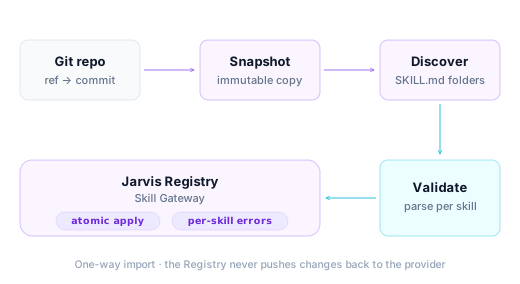
One-way import · the Registry never pushes changes back to the provider
The AI Skills CLI is the delivery layer for accessible Registry skills. It syncs approved content into personal or project environments for Claude Code, Codex, and GitHub Copilot, so every developer works from the same governed source.
Share approved content with developers without publishing private skills to a public marketplace.
Explore AI Skills CLI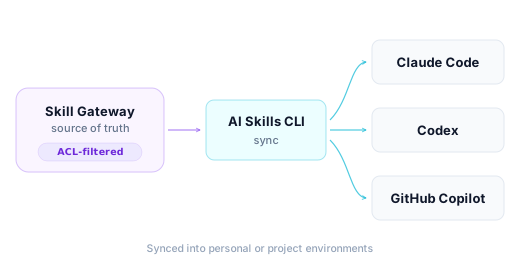
Synced into personal or project environments
The Skill Gateway is the private control plane for organization-curated AI skills. These rows cover the facts that decide whether it fits your team's workflow.
Three steps take a team from skills scattered across repositories to a governed catalog delivered to every developer tool.
Authorize your Git provider through an app or OAuth connection and configure the repository paths used for skill discovery.
Keep skills private by default and grant access per user, group, and skill resource.
Use the AI Skills CLI to sync accessible, approved skills into personal or project environments.
The Skill Gateway is part of Jarvis Registry, the customer-controlled control plane for governing enterprise AI skills, agents, and tools.
See how the Skill Gateway keeps approved skills private, governed, and consistently delivered to every developer tool.
Available on AWS MarketplaceThese come up when platform teams evaluate how private skills are imported, governed, and delivered.
No. Import runs in one direction, from repository to Registry. The Registry reads the repository through an app or OAuth connection and never writes back.
Each discovered skill is parsed and validated before the batch is applied atomically. Item-level errors are retained, so operators can see which skills were skipped or failed without losing the overall job report.
Skills are private by default. The creator receives full permissions, and other users receive only the access explicitly granted to them. Listing and content endpoints filter by ACL.
The AI Skills CLI syncs accessible, approved skills into personal or project environments for Claude Code, Codex, and GitHub Copilot.